Overview
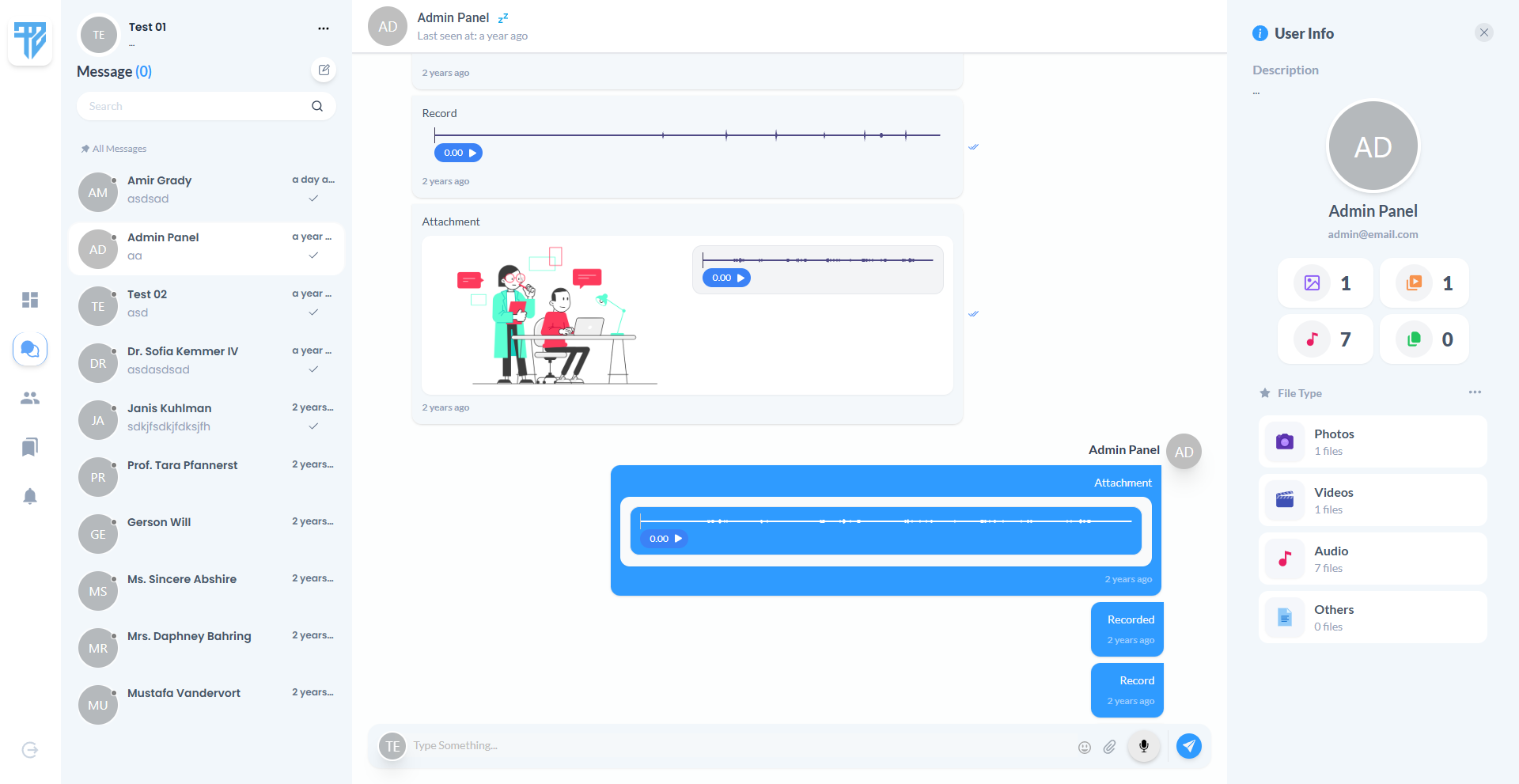
Instant Chat is a full-stack web application centered on real-time communication between registered members. It lives in the messaging and team collaboration domain, offering a familiar chat layout with a conversation list, active thread view, and optional details panel. The product is built for individuals and small teams who need a self-hosted or custom chat environment rather than a third-party consumer messenger. At its core, it delivers instant message delivery, presence awareness, and rich media sharing inside a responsive browser interface that works on desktop and mobile screens.
Purpose & Problem Statement
Scattered communication across email, social apps, and ad-hoc tools creates friction for teams, communities, and support-style interactions. Messages arrive late, context is lost, and there is no single place to see who is available and what still needs a reply. Instant Chat addresses this by giving every member a unified inbox where conversations update live, unread counts stay visible, and administrators can moderate who participates. Instead of waiting for page refreshes or polling, users see new messages, typing activity, and read status as events happen. The product turns asynchronous back-and-forth into a continuous, in-the-moment conversation experience.
Who It's For
Instant Chat serves distinct audiences who share a need for direct, accountable messaging inside a controlled environment.
- Everyday members — people who register, build a profile, and chat one-on-one with others in the community; they benefit from a clean inbox, search, and real-time delivery without installing desktop software.
- Community administrators — operators responsible for onboarding users, toggling account status, assigning roles, and initiating conversations with members who need attention.
- Visitors and prospects — people who land on the public site to learn about the product, read planned blog content, or reach out through the contact page before creating an account.
- Small teams evaluating self-hosted chat — groups that want a customizable messaging layer they can extend, rather than committing to a closed commercial platform.
Core Features
- Real-Time Direct Messaging — Users open a conversation and send text that appears immediately for both parties. Messages stream in without reloading the page, keeping dialogue natural and continuous.
- Rich Message Composer — The message area supports emoji input, voice recording, and file attachments alongside plain text. Users can combine formats in a single send action when the situation calls for more than words.
- Reply Threading — Any message can be quoted in a reply, surfacing the original content above the new response. This preserves context in fast-moving threads and reduces confusion about what is being answered.
- Conversation List with Search — A sidebar shows all active chats sorted by recent activity, with unread badges and online indicators. A search field filters conversations by participant name so users can jump to the right thread quickly.
- Read Receipts and Seen Status — When a recipient views messages, senders can see that content has been seen. This closes the loop on whether a message was noticed, which matters for time-sensitive coordination.
- Typing Indicators — While someone is composing a reply, the other party sees a typing signal in the thread. This small cue makes the exchange feel live and reduces duplicate messages.
- Online Presence — Members appear online or offline based on active sessions. Presence updates propagate across the app so users know when someone is likely to respond immediately.
- Starred Conversations — Important threads can be marked as starred and filtered separately from the full inbox. This gives users a lightweight way to pin priority contacts without a separate folder system.
- Chat Details Panel — Opening the details view shows participant information, a short description, and counts of shared images, videos, audio clips, and other files. It acts as a quick reference for the relationship and media history inside a thread.
- Admin User Management — Administrators browse a paginated directory of members with filters for status, privacy, and email verification. From each card they can activate or deactivate accounts, toggle privacy, change roles, archive or restore users, and start or resume a chat.
- Account and Profile Management — Registered users update their name, email, and password, verify email when required, and delete their account. Extended profile fields such as tagline, bio, phone, country, and avatar picture personalize how they appear in chat.
- Public Marketing Pages — Before signing in, visitors explore a landing page with feature highlights, an about page, a contact form layout, and placeholder blog sections that establish the product's positioning.
How It Works
A new visitor arrives at the public landing page, which introduces the messaging product and invites registration or login. From there they can browse informational pages, view contact details, or proceed to create an account. Registration collects standard credentials; once signed in, the member is directed into the authenticated area of the web app.
The primary daily workflow happens on the chat screen. A collapsible sidebar navigation links to dashboard, chats, groups, bookmarks, and notifications areas, though several of those destinations currently display placeholder content. The chats section is fully active: the left column lists conversations with avatars, last message previews, unread counts, and online dots. Selecting a conversation loads the message history in the center column, with older messages available through incremental loading.
To send a message, the user types in the composer at the bottom, optionally opens the emoji picker, attaches files through a drag-and-drop modal, or records a voice note. Pressing send delivers the content in real time to the other participant while also persisting it for future sessions. Users can open a message menu to reply to a specific item or copy its text. On wider screens, a right-hand details panel shows profile or group summary information and media statistics.
Administrators follow a parallel path under a separate URL prefix. After login, they land on a user management dashboard instead of the member chat home. They filter and paginate through the user base, adjust account settings inline, and launch conversations with any member directly from a user card. Both roles share the same underlying chat interface once inside a thread.
Returning users simply log in, see updated unread totals in the navigation badge, and resume whichever conversation matters most. Dark mode preference is remembered locally, and the layout adapts between mobile and desktop breakpoints so the conversation list and thread view swap visibility appropriately on smaller screens.
System Capabilities
- Self-service registration, login, logout, and password reset
- Email verification workflow for new and changed email addresses
- Profile editing with extended personal fields and avatar
- Account deletion with password confirmation
- Soft deletion and restoration of user records by administrators
- One-to-one conversations created on demand between any two members
- Text, voice recording, attachment, and combined message types
- Reply-to-message with quoted context
- Message copy from contextual menu
- Paginated message history within each conversation
- Unread message counting at conversation and global levels
- Live message delivery through WebSocket broadcasting
- Per-conversation and per-user private channels
- Visitor presence channel for online and offline transitions
- Typing whispers within active conversation rooms
- Seen-event broadcasting when messages are read
- Unread count refresh events after new activity
Conversation Organization
- Search conversations by participant name
- Filter starred conversations separately from all chats
- Sort conversations by most recent activity
- Star or unstar individual threads
- Upload images, videos, documents, and audio files as attachments
- Inline audio playback with waveform visualization for voice messages
- Image and video preview within the message bubble grid
- Media upload endpoint for recordings and attachments
- Image processing support for uploaded visuals
- Paginated user grid with configurable page size and sort order
- Filter users by active, inactive, or archived status
- Filter by public or private privacy setting
- Filter by email verified or unverified state
- Toggle user active status and privacy inline
- Promote or demote between member and administrator roles
- Archive or restore user accounts
- Initiate or continue a direct conversation with any managed user
- Animated marketing landing page with feature cards and social proof placeholders
- About page for product narrative
- Contact page with information layout and message form structure
- Blog listing and detail page shells
Authentication & Security
- Session-based web authentication
- Role-based route separation for members and administrators
- API token support via Sanctum for authenticated API access
- Password hashing and confirmation for sensitive actions
Tech Stack
- React 18 with Inertia.js for server-driven single-page navigation
- Tailwind CSS with Material Tailwind and Ant Design component libraries
- Headless UI for accessible interactive primitives
- Framer Motion for page and layout animations
- Sass for supplementary styling
- Vite for frontend asset bundling
- MySQL as the default relational database
- Laravel Breeze with session-based web authentication
- Laravel Sanctum for API token authentication
- Laravel Echo with Pusher protocol client
- Pusher PHP server integration
- Beyond Code Laravel WebSockets for self-hosted WebSocket option
- Redis via Predis for cache and optional queue or broadcast backing
- Local filesystem for uploaded media and profile images
- AWS S3 configuration available for cloud object storage
- Intervention Image for server-side image handling
- Laravel queue system with database jobs table
- Sync driver by default in development configuration
- SMTP mail transport with configurable Mailpit for local development
- PHPUnit for automated testing
- Laravel Pint for code formatting
- Laravel Sail for containerized development
- Ziggy for sharing named routes with the frontend
- Axios for HTTP requests from the browser
User Experience & Interface
The authenticated experience uses a persistent sidebar navigation with icon labels, unread badges, theme toggle, and logout control. The chat workspace follows a three-column mental model on large screens: conversations on the left, the active thread in the center, and optional participant details on the right. On tablets and phones, columns collapse so users focus on either the list or the thread at one time, with animated transitions between states.
Visual design leans on soft shadows, rounded cards, avatar circles with initials fallbacks, and a primary accent color for outgoing message bubbles. Incoming messages use a neutral background while outgoing messages use the brand tone. Toast notifications surface validation errors and success feedback without blocking the workflow. The admin dashboard swaps the chat layout for a card grid with inline switches, dropdown action menus, and filter controls across the top bar.
The public-facing pages use a separate guest layout with hero sections, motion-driven reveals on scroll, and dark mode support consistent with the signed-in area. Forms follow standard patterns: labeled inputs, inline error messages, and primary action buttons.
Access & Permissions
- Member — Can access the member dashboard area, full chat functionality, profile settings, conversation creation, media uploads, and personal presence controls. Cannot reach administrator routes or manage other users.
- Administrator — Has all member capabilities under an admin URL prefix plus access to the user management dashboard. Can change other users' status, privacy, and role; archive or restore accounts; and start conversations with any non-primary user in the directory.
Data & Content Management
The platform manages people, their extended profiles, conversation threads, individual messages, group definitions, membership records, read-state tracking, and starred conversation preferences. Media shared in chat is stored as references to uploaded files with type metadata for rendering.
- User accounts — Created at registration or seeded for demonstration; updated through profile forms; soft-deleted or restored by admins; carry role, status, privacy, and last-seen timestamps.
- Profiles — Created alongside users; hold tagline, biography, phone, country, tags, hourly rate field, and profile picture path; displayed in chat headers and details panels.
- Conversations — Created when two users first connect or when an admin initiates contact; link sender and receiver identifiers with a unique room reference; support a group flag for future multi-party threads.
- Messages — Appended to conversations in chronological order; support text body, audio recording path, JSON attachment arrays, reply references, and seen timestamps; soft-deletable in schema though delete UI is not fully exposed.
- Groups — Defined in data with name, icon, creator, type, privacy, and description; seeded for development but not yet manageable through the member-facing groups page.
- Starred threads — Per-user markers associating a member with conversations they want quick access to.
Integrations & External Connections
- WebSocket broadcasting via Pusher-compatible services — powers live message delivery, typing signals, presence, and unread count updates across connected browsers
- Self-hosted WebSocket server option — Laravel WebSockets package enables running broadcast infrastructure on the same stack without a third-party Pusher account
- SMTP email delivery — supports transactional messages such as password resets and email verification notices
- AWS S3 — optional cloud storage backend for uploaded chat media and assets when configured
- Redis — optional caching and broadcast driver for improved real-time performance at scale
Strengths & Highlights
- Fully functional real-time one-to-one chat with a polished three-panel layout and responsive behavior
- Rich composer supporting emoji, voice notes, and multi-file attachments in a single message flow
- Reply threading and read receipts that make conversations feel modern and accountable
- Strong administrator tooling for filtering, moderating, and messaging users from one dashboard
- Dual-role architecture cleanly separates member and admin experiences while sharing chat infrastructure
- Thoughtful UX touches including dark mode persistence, typing indicators, online presence, and waveform audio playback
- Marketing site and authenticated app coexist in one deployable product
Current Limitations
- Member dashboard, dedicated groups page, bookmarks page, and notifications page all show "Coming Soon" placeholders despite navigation entries and partial backend support
- Group creation modal and group chat UI are not yet available to end users
- Blog content on the public site is placeholder rather than a working content management flow
- Message edit and delete actions exist in code paths but are disabled or incomplete in the user interface
- Admin "Add New User" button is present without a completed creation workflow behind it
- API surface is minimal beyond a single authenticated user endpoint; most functionality is web-session only
- Real-time features depend on correct WebSocket and Pusher environment configuration, which defaults to log driver in the sample environment
- Google Maps dependency is included in the frontend packages but not visibly used in current screens
Potential Next Steps
- Ship the groups experience end to end so members can create, join, and chat in multi-party rooms
- Replace placeholder pages for bookmarks and notifications with working filtered views of starred threads and system alerts
- Build out the member dashboard with conversation summaries, recent activity, and quick actions
- Enable message editing and deletion with clear UI affordances and audit-friendly behavior
- Complete admin-driven user creation from the dashboard without requiring self-registration
- Publish real blog posts or connect the blog section to a simple content source
- Expand API coverage for mobile clients or third-party integrations using token authentication
- Add end-to-end notification preferences so users control email and in-app alert behavior