Overview
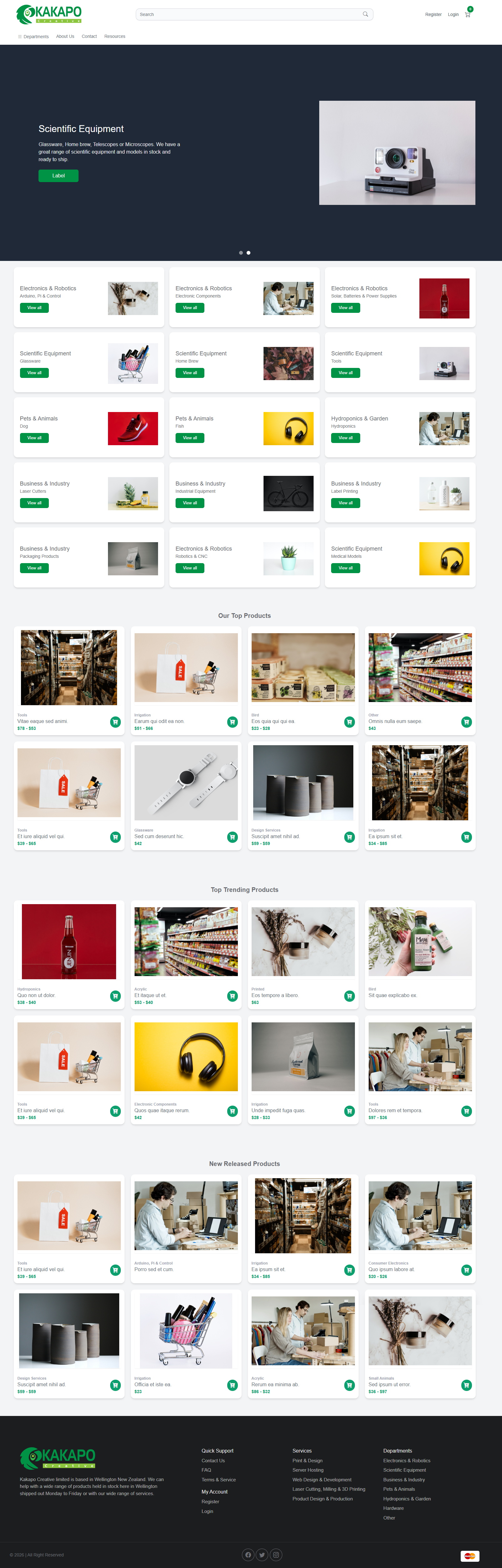
Kakapo is a full-stack web application operating in the domain, hosting, and print design space, built for customers seeking a one-stop shop for their digital and creative services. The platform offers domain registration, web hosting packages, print design products, and server management capabilities, all through a user-friendly web interface. Users can browse products, manage their accounts, place orders, and even track server deployments, while administrators have full control over product catalogs, orders, and user management. The core value Kakapo delivers is simplifying the process of setting up and managing digital presence by bringing multiple related services together in a single, cohesive experience.
Purpose & Problem Statement
Individuals and small businesses often struggle to manage their digital services across multiple platforms: they might register a domain with one provider, purchase hosting from another, and order print materials from a third, leading to fragmented workflows, forgotten logins, and disjointed customer experiences. Setting up web servers and managing hosting can also be technically daunting for non-experts, requiring specialized knowledge that many business owners don’t have. Kakapo solves this by consolidating domain registration, web hosting, print design products, and server management into a single web application, making it easy for anyone to get online and manage their services without needing technical expertise or juggling multiple vendors.
Who It's For
Kakapo serves a diverse set of users looking to establish or maintain their digital and creative presence.
- Small Business Owners — need a simple way to register domains, set up hosting, and order branded print materials for their business
- Freelancers & Creatives — want a platform to manage their own website hosting and order print products like business cards or flyers
- Tech Enthusiasts — appreciate having server management capabilities alongside basic hosting services
- Administrators & Support Teams — use the backend tools to manage products, process orders, and support customers
Core Features
- Domain Registration & Management — Users can search for available domain names, register new domains, and manage their existing domain portfolio. The interface guides them through checking availability, selecting options, and completing registration, with clear status updates on domain ownership and renewal.
- Web Hosting Packages — The platform offers pre-configured web hosting packages with different specifications, allowing users to choose the right plan for their needs. Packages are clearly described with features and pricing, making it easy to compare and select.
- Server Management & Deployment — For users who need more control, Kakapo includes server deployment and management capabilities. Users can initialize servers, track deployment progress, and manage server resources through an intuitive interface, with automated setup steps handling technical complexity behind the scenes.
- E-Commerce for Products & Services — A full shopping cart system lets users browse products, add items to their cart, apply discount coupons, and complete purchases. The platform supports multiple product types including print design items, digital services, and subscriptions.
- Order Management & Invoicing — Users can view their order history, track order status, and download PDF invoices for their purchases. Administrators have a dedicated interface to manage all orders, update statuses, and handle customer requests.
- User Account System — Customers can create accounts, update their personal information and addresses, manage their subscriptions, and access their service dashboards. The system includes secure authentication and account recovery features.
- Product Catalog & Categories — Products are organized into categories and subcategories for easy browsing, with detailed product pages showing specifications, pricing, and options. Administrators can add, edit, and manage products through the backend.
- Analytics & Tracking — The platform tracks user activity, page views, and search history to help administrators understand how customers are using the site, identify popular products, and make data-driven decisions.
How It Works
For users accessing Kakapo, the journey starts at the public website, where they can browse products, search for domains, and learn about available services. When ready to make a purchase, users create an account or log in to an existing one, which takes them to their personal dashboard. From there, they can search for a domain name, add it to their cart, select a hosting package, and add any print design products they need.
Once items are in the cart, users proceed to checkout, where they enter their billing and shipping information, apply any discount coupons, and complete payment. After the order is placed, users receive confirmation and can track their order status through their account dashboard. For hosting and server products, automated deployment processes begin in the background, with users able to track progress in real time.
For server management, users with hosting services can access a dedicated server dashboard where they can view server status, manage resources, and perform administrative tasks through a simplified interface that hides much of the technical complexity. Administrators use a separate backend interface to manage the entire platform, including adding new products, processing orders, managing users, and viewing analytics.
System Capabilities
- Create and manage customer accounts with personal profiles and addresses
- Assign user roles and control access to administrative features
- Secure authentication with password recovery and verification
Product & Catalog Management
- Organize products into categories and subcategories
- Create, edit, and remove products with detailed descriptions, pricing, and images
- Manage sub-products and product variations
- Set up discount coupons and promotional offers
Order & Payment Processing
- Full shopping cart system with quantity updates and coupon application
- Order tracking with status updates from placement through fulfillment
- PDF invoice generation for customer records
- Integration with payment providers for secure checkout
Domain & Hosting Services
- Domain name search and registration workflow
- Web hosting package selection and management
- Server deployment and lifecycle management
- SSL certificate setup and management
- Proxy configuration for hosted services
- Automated server initialization with multi-step deployment
- Server resource management and monitoring
- Firewall and security configuration
- Disk resizing and resource scaling
- Manage printable documents and resources
- Slider and banner management for the public website
- Contact form handling and subscriber management
- Document and resource library
- Track page views and user activity across the site
- Monitor search history and popular products
- User tracking and session analytics
- Dashboard with key metrics and visualizations
Tech Stack
- Livewire for interactive components
- Bootstrap 5 for UI framework
- Tailwind CSS for utility-first styling
- SASS for stylesheet preprocessing
- Flowbite for UI components
- Material Tailwind for design elements
- Bootstrap Icons for iconography
- MySQL (with Eloquent ORM for data access)
- Laravel UI for authentication scaffolding
- Laravel Sanctum for API tokens
- darryldecode/cart for shopping cart functionality
- barryvdh/laravel-dompdf and dompdf/dompdf for PDF generation
- Intervention Image for image processing
- Guzzle HTTP for external API requests
- Laravel Mail for email notifications
- php-flasher/flasher-laravel for user flash messages
- Laravel Tinker for REPL access
- Laravel Sail for local development
- Laravel Pint for code formatting
- Barryvdh Laravel Debugbar for development debugging
- Spatie Laravel Ignition for error handling
- FakerPHP for test data generation
User Experience & Interface
Kakapo features a clean, modern interface with distinct sections for different user roles. The public-facing website uses a responsive design with clear navigation menus, product categories, and search functionality, making it easy for customers to find what they’re looking for. Product pages are well-organized with detailed information, pricing, and clear calls to action.
For logged-in customers, the personal dashboard provides a central hub where they can view their orders, manage their domains and hosting, update their account information, and access support resources. Interactive elements powered by Livewire provide smooth, dynamic experiences without requiring full page reloads, making the interface feel responsive and modern.
The administrative backend uses a structured dashboard layout with sidebar navigation, data tables, and forms for managing products, orders, and users. Charts and visualizations help administrators quickly understand key metrics, while filtering and sorting tools make it easy to find specific records. Modal dialogs and wizards guide users through complex tasks like server deployment, breaking the process down into simple, manageable steps.
Access & Permissions
Kakapo implements a role-based access control system with two primary roles:
- Customer — Regular users who can browse products, place orders, manage their account information, view their order history, and access their hosting and domain management dashboards. Customers can update their personal details, addresses, and payment methods, but cannot access administrative features.
- Administrator — Admin users have full access to the backend management interface, including product management, order processing, user management, analytics, and server administration. Admins can create and edit products, process orders, manage user accounts, view detailed analytics, and perform server maintenance tasks.
Data & Content Management
Kakapo manages a wide range of data types to support its services, including user information, product catalogs, orders, domain records, hosting configurations, and analytics data.
- User Accounts — Created during registration or by administrators, with profiles that include personal information, addresses, and account preferences. Users can update their own information, and admins can manage all accounts.
- Products — Created and managed through the admin interface, organized into categories and subcategories, with detailed descriptions, pricing, images, and options. Products can be activated, deactivated, or removed as needed.
- Orders — Generated when customers complete checkout, with line items for each product, pricing details, and order status that updates as the order progresses. Orders can be viewed and managed by both customers and admins.
- Domains — Managed through the domain registration system, with records of registered domains, ownership information, and renewal dates.
- Hosting & Servers — Tracked through the hosting management system, with details about server configurations, resource allocations, deployment status, and performance metrics.
- Analytics Data — Automatically collected as users interact with the site, including page views, search history, and user activity, which is then aggregated and displayed in admin dashboards.
Integrations & External Connections
- Payment Processing via PayPal — Integrates with PayPal to handle secure online payments for orders, allowing customers to pay using their PayPal accounts or credit cards.
- Proxmox Server Management — Connects to Proxmox for server virtualization and management, enabling automated server deployment, configuration, and monitoring.
- Cloud File Storage — Stores uploaded images, documents, and other media files, serving them efficiently to users.
- Transactional Email Provider — Sends automated emails for welcome messages, order confirmations, password resets, and other notifications to keep users informed.
Strengths & Highlights
- Unified Platform — Brings domain registration, hosting, print design, and server management together in one place, eliminating the need for multiple vendors.
- User-Friendly Server Management — Simplifies complex server deployment and management tasks through an intuitive interface, making them accessible to non-technical users.
- Full E-Commerce Capabilities — Robust shopping cart, order management, and invoicing features support multiple product types and payment options.
- Role-Based Access — Clear separation between customer and admin interfaces ensures security and ease of use for different user types.
- Interactive Livewire Components — Dynamic, responsive user experiences without heavy frontend frameworks, making the application fast and maintainable.
- Comprehensive Analytics — Detailed tracking of user activity and site performance helps administrators make informed decisions.
Current Limitations
- Limited Payment Options — Currently supports only PayPal for payments, which may not be ideal for all customers.
- Single Hosting Provider Integration — Server management is tied to a specific virtualization platform, limiting flexibility for some use cases.
- No Mobile App — The platform is web-only, with no dedicated mobile application for on-the-go management.
- Limited Documentation — The product currently lacks comprehensive user documentation and help resources.
Potential Next Steps
- Add More Payment Gateways — Integrate additional payment options like Stripe, credit card processing, and bank transfers to give customers more choice.
- Develop a Mobile App — Create a companion mobile application for customers to manage their services on the go.
- Expand Hosting Options — Add support for additional hosting providers and cloud platforms to give users more flexibility.
- Improve Documentation — Create comprehensive user guides, tutorials, and a knowledge base to help users get the most out of the platform.
- Add More Server Management Features — Expand server administration capabilities with additional monitoring, backup, and scaling options.
- Implement Real-Time Notifications — Add SMS and push notifications to keep users updated on order status and server events.